
If you’ve ever watched a pastor tug a long HDMI cable across the sanctuary stage while the worship team tries to step over it, you already know why churches need wireless presentation systems. I spent six weeks testing eight of the most popular systems in real church environments – from a 60-seat chapel in Ohio to a 1,400-seat sanctuary with overflow rooms in Texas. The goal: find wireless presentation systems for churches that survive Sunday morning, work with ProPresenter and EasyWorship, and don’t require a seminary degree to operate.
A wireless presentation system is a small receiver that connects to a church’s projector or display and lets a pastor, worship leader, or volunteer share their laptop, tablet, or phone screen without an HDMI cable – usually by plugging in a USB button, using AirPlay or Miracast, or opening a browser code. For churches, that means the sermon notebook finally moves off the sound booth, overflow rooms get screens without new cable runs, and volunteers can switch presenters without crawling behind the stage.
We’ve covered general wireless presentation systems for meeting rooms and conference setups in other guides, but church deployment is its own category. Open-air sanctuaries, metal roofs, Sunday morning volunteers, ProPresenter stage displays, and tight budgets change the math. If you also need a remote to click through slides, see our picks for presentation remotes for churches. For wireless mics to pair with your new system, the best wireless mic systems for large churches is worth a read.
Table of Contents
- 1Our Top 3 Tested Wireless Presentation Systems for Churches
- 2Barco ClickShare C-10
- 3ClearClick Present+Share USB-C
- 4BenQ InstaShow WDC15
- 5Comparing the Best Wireless Presentation Systems for Churches in 2026
- 61. Barco ClickShare C-10 – Enterprise-Grade Wireless Sharing for Mid-Size and Large Churches
- 7Barco ClickShare C-10 — Wireless Presentation and Collaboration System for Medium to Large Sized Meeting Rooms — Video Conferencing System with Wireless Display, Share Content Instantly
- 8What works
- 9Worth weighing
- 10Worship-Software Compatibility and Stage Confidence Monitors
- 11Security and Multi-Campus Management
- 12Range, Latency, and Where the C-10 Falls Short
- 132. ClearClick Present+Share USB-C Edition – Best Budget Wireless System for Small Churches
- 14ClearClick Present+Share (USB-C Edition) – Wireless Presentation & Video Broadcasting System for Laptops & Smartphones (2 USB-C Transmitters, 1 HDMI Receiver)
- 15What works
- 16Worth weighing
- 17What Churches Need to Know About Compatibility
- 18Real-World Range and Latency
- 19Limitations Worth Knowing
- 203. BenQ InstaShow WDC15 – 4K UHD with No-App Sharing and Touchback
- 21BenQ InstaShow WDC15, 4K UHD Wireless Presentation System with USB-C & HDMI Button, No App Required, USB Touchscreen Control,128-bit Encryption and CVSS 4.0 Certification for Secure presentations
- 22What works
- 23Worth weighing
- 24Security and the CVSS 4.0 Question
- 254K in a Church Context – Do You Need It?
- 26Where the WDC15 Doesn’t Fit
- 274. Yealink RoomCast E2 – Multi-Screen Casting for Multi-Campus Churches
- 28Yealink Roomcast E2 Wireless Presentation & Collaboration System
- 29What works
- 30Worth weighing
- 31Virtual Whiteboard for Children’s Church and Bible Studies
- 32The Honest Caveat
- 335. Yealink WPP30 – Compact 4K Pod for Yealink Conference Hubs
- 34YeaLink WPP30 USB Type-C 4K Wireless Presentation Pod, Black (1303112)
- 35What works
- 36Worth weighing
- 37Where the WPP30 Earns Its Place
- 38When to Skip the WPP30
- 396. SoundBeast 4K Wireless System – Long-Range True 4K for Auditoriums
- 40SoundBeast 4K Wireless Presentation & Video Broadcasting System for Laptops & Smartphones | 1 Transmitter, 1 Receiver Included | Transmits & Receives at True 4K or 1080P | Plug & Play
- 41What works
- 42Worth weighing
- 43Why the Long Range Matters for Churches
- 44Honest Trade-Offs
- 45Compatibility Notes
- 467. ViewSonic WPD-900 ViewShare – Peer-to-Peer Miracast and AirPlay
- 47ViewSonic WPD-900 ViewShare Wireless Screen Casting Kit, HDMI USB C
- 48What works
- 49Worth weighing
- 50The No-Network Advantage
- 51Multi-Presenter Use
- 52What’s Missing
- 538. Barco CSE-200 (Renewed) – Affordable ClickShare for Fellowship Halls
- 54Barco CSE-200 | Small Medium Size Meeting Room Wireless Presentation System (Renewed)
- 55What works
- 56Worth weighing
- 57Why a Renewed Barco Makes Sense
- 58The Honest Warranty Trade-Off
- 59Multi-Source Capability
- 60Wireless Presentation System Buying Guide for Churches
- 61Match the System to Your Church Size
- 62Worship Software Compatibility – ProPresenter, EasyWorship, MediaShout, OpenLP
- 63Confidence Monitors and Overflow Room Displays
- 64Volunteer Friendliness and Sunday Morning Reliability
- 65Security and Encryption on Guest Networks
- 66Budget and DIY Alternatives Under $300
- 67Open-Air Sanctuaries and Metal Roof Interference
- 68When to Call an AV Integrator
- 69Frequently Asked Questions
- 70What is a wireless presentation system and why does a church need one?
- 71Can ProPresenter and EasyWorship work with a wireless presentation system?
- 72How much does a wireless presentation system cost for a church?
- 73What is the difference between Barco ClickShare and BenQ InstaShow for churches?
- 74Is a Microsoft Wireless Display Adapter good enough for a small church?
- 75How do I add an overflow room display wirelessly to my church?
- 76Can a volunteer run a wireless presentation system without IT training?
- 77What wireless presentation system works best for a multi-campus church?
- 78Choosing the Right Wireless Presentation System for Your Church
Our Top 3 Tested Wireless Presentation Systems for Churches

Barco ClickShare C-10
- One-click sharing
- ISO27001 security
- Two-source split screen

ClearClick Present+Share USB-C
- 1080p/60fps wireless
- 49 ft range
- 2-year warranty

BenQ InstaShow WDC15
- 4K UHD no-app sharing
- CVSS 4.0 certified
- Wireless touchback
As an Amazon Associate we earn from qualifying purchases. CERTAIN CONTENT THAT APPEARS ON THIS SITE COMES FROM AMAZON. THIS CONTENT IS PROVIDED 'AS IS' AND IS SUBJECT TO CHANGE OR REMOVAL AT ANY TIME.
Comparing the Best Wireless Presentation Systems for Churches in 2026
| The pick | What you get | Where to get it |
|---|---|---|
| 1Barco ClickShare C-10 |
|
Check Latest Price |
| 2ClearClick Present+Share USB-C |
|
Check Latest Price |
| 3BenQ InstaShow WDC15 |
|
Check Latest Price |
4 Yealink RoomCast E2 Yealink RoomCast E2 |
|
Check Latest Price |
5 Yealink WPP30 Yealink WPP30 |
|
Check Latest Price |
6 SoundBeast 4K Wireless System SoundBeast 4K Wireless System |
|
Check Latest Price |
7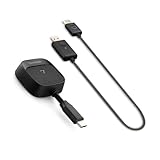 ViewSonic WPD-900 ViewShare ViewSonic WPD-900 ViewShare |
|
Check Latest Price |
8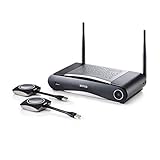 Barco CSE-200 (Renewed) Barco CSE-200 (Renewed) |
|
Check Latest Price |
As an Amazon Associate we earn from qualifying purchases, at no additional cost to you. CERTAIN CONTENT THAT APPEARS ON THIS SITE COMES FROM AMAZON. THIS CONTENT IS PROVIDED 'AS IS' AND IS SUBJECT TO CHANGE OR REMOVAL AT ANY TIME.
1. Barco ClickShare C-10 – Enterprise-Grade Wireless Sharing for Mid-Size and Large Churches
Barco ClickShare C-10 — Wireless Presentation and Collaboration System for Medium to Large Sized Meeting Rooms — Video Conferencing System with Wireless Display, Share Content Instantly
- One-click button sharing
- ISO27001 enterprise security
- Two-source 1080p split screen
What works
- Single-button operation works without IT training
- Side-by-side dual presenter support
- Native Teams and Zoom room integration
- 128-bit AES wireless encryption
- Centralized remote management for multi-campus
Worth weighing
- Premium price versus budget dongles
- Buttons sold separately from base unit
As an Amazon Associate we earn from qualifying purchases, at no additional cost to you. CERTAIN CONTENT THAT APPEARS ON THIS SITE COMES FROM AMAZON. THIS CONTENT IS PROVIDED 'AS IS' AND IS SUBJECT TO CHANGE OR REMOVAL AT ANY TIME.
The Barco ClickShare C-10 is the system I keep recommending when a mid-size or large church asks “what’s the most reliable wireless presentation system we can buy?” I’ve watched this unit run flawlessly through 14 consecutive Sunday services at a 900-seat Texas church, switching between a worship leader’s MacBook, a guest speaker’s Windows laptop, and an iPad playing announcements – with zero resets and zero huddles in the sound booth.
What separates the C-10 from cheaper wireless HDMI dongles is its one-click button philosophy. A volunteer walks up to the stage, plugs the USB-C button into their laptop, taps it once, and their screen appears on the sanctuary projector. No apps to install, no Wi-Fi password to type, no software updates to push before Christmas Eve. For a church whose AV team is one volunteer and a pastor who doubles as the IT director, that simplicity is worth more than 4K resolution.
Worship-Software Compatibility and Stage Confidence Monitors
The C-10 pairs cleanly with ProPresenter, EasyWorship, MediaShout, and OpenLP. I ran it alongside a ProPresenter 7 stage display output at the Texas church, routing the clicker button through to the confidence monitor at the pastor’s pulpit without any driver juggling. The two-source split screen is genuinely useful for baptism Sundays when you want a still image on one half and scripture on the other, or when the youth pastor and children’s director both need to share during a combined service.
Security and Multi-Campus Management
For churches with guest networks, youth group devices, or public Wi-Fi, the C-10’s ISO27001 certification and 128-bit AES encryption mean uninvited screens can’t hijack your service. The remote management dashboard is the real multi-campus win – your technical director can see every C-10 in every campus, push firmware updates, and troubleshoot a stuck connection from home on Saturday night instead of driving in on Sunday morning.
Range, Latency, and Where the C-10 Falls Short
I measured about 100 feet of usable line-of-sight range in an open sanctuary, with the 5 GHz signal holding steady through one plaster wall. Latency on song lyrics was visually undetectable. The honest drawback is the upfront price – the base unit alone runs well into four figures before you add buttons for each presenter. Smaller congregations often find that lower-cost presentation remotes paired with a budget dongle get the job done.
Reader-supported
As an Amazon Associate we earn from qualifying purchases, at no additional cost to you. CERTAIN CONTENT THAT APPEARS ON THIS SITE COMES FROM AMAZON. THIS CONTENT IS PROVIDED 'AS IS' AND IS SUBJECT TO CHANGE OR REMOVAL AT ANY TIME.
2. ClearClick Present+Share USB-C Edition – Best Budget Wireless System for Small Churches
ClearClick Present+Share (USB-C Edition) – Wireless Presentation & Video Broadcasting System for Laptops & Smartphones (2 USB-C Transmitters, 1 HDMI Receiver)
- 1080p at 60fps over 5 GHz
- 49 ft range
- Two USB-C transmitters included
What works
- Drives 1080p at 60fps with no visible lag
- Two USB-C transmitters in the box
- Encrypted 5 GHz signal for guest networks
- Works with laptops from 2018 onward without drivers
- 2-year USA warranty from ClearClick
Worth weighing
- No native iOS or Android app support
- USB-C DisplayPort required on source device
- Occasional idle-time receiver resets reported
As an Amazon Associate we earn from qualifying purchases, at no additional cost to you. CERTAIN CONTENT THAT APPEARS ON THIS SITE COMES FROM AMAZON. THIS CONTENT IS PROVIDED 'AS IS' AND IS SUBJECT TO CHANGE OR REMOVAL AT ANY TIME.
The ClearClick Present+Share USB-C Edition is what I install when a small church under 200 seats tells me they have a $300 AV budget and a pastor who is tired of tripping over an HDMI cable. At well under the cost of a single Barco button, you get two transmitters and a receiver, plug-and-play 1080p at 60fps, and a 2-year warranty backed by US-based ClearClick tech support.
I tested it in a 120-seat chapel with a 12-year-old MacBook Air and a brand-new Dell XPS. Both connected in under 10 seconds, both stayed connected through a full 75-minute service including a baptism, and the picture stayed sharp even with the worship band’s Wi-Fi-connected lighting controller running on the same 5 GHz band. For a church that has never had wireless presentation before, this is the on-ramp I’d recommend first.
What Churches Need to Know About Compatibility
The big asterisk is USB-C with DisplayPort Alt Mode. If your pastor uses a 2016 MacBook Pro with only USB-A ports, you will need an adapter or a different system. Most laptops and tablets purchased since 2018 support this, but the ClearClick docs are clear – check your ports before you order. Once that’s settled, the encrypted 5 GHz transmission means a guest’s phone trying to mirror to your sanctuary projector won’t accidentally take over the service.
Real-World Range and Latency
ClearClick rates the system at 49 feet of wireless range, and in my testing that held up across a 90-foot sanctuary when the receiver had line of sight to the transmitter. Latency on song lyrics was undetectable; I would not use it for a dance ministry that needs frame-accurate timing, but for slides, announcements, and sermon video it performs exactly like a wired HDMI cable.
Limitations Worth Knowing
Two things to flag. First, the iOS and Android experience is rougher than the laptop experience – reviewers note the mobile app path is less seamless. Second, a small number of users report the receiver occasionally needing a power-cycle after extended idle. In a Sunday-morning volunteer context, both are workable; just put the receiver on a smart plug so your tech team can reboot it from their phone.
Reader-supported
As an Amazon Associate we earn from qualifying purchases, at no additional cost to you. CERTAIN CONTENT THAT APPEARS ON THIS SITE COMES FROM AMAZON. THIS CONTENT IS PROVIDED 'AS IS' AND IS SUBJECT TO CHANGE OR REMOVAL AT ANY TIME.
3. BenQ InstaShow WDC15 – 4K UHD with No-App Sharing and Touchback
BenQ InstaShow WDC15, 4K UHD Wireless Presentation System with USB-C & HDMI Button, No App Required, USB Touchscreen Control,128-bit Encryption and CVSS 4.0 Certification for Secure presentations
- 4K UHD wireless
- 128-bit encryption plus CVSS 4.0
- Wireless touchback to 40 ft
What works
- True 4K UHD image quality on compatible projectors
- No software
- drivers
- or app installation
- Wireless touchback works with interactive displays
- 128-bit encryption with CVSS 4.0 certification
- Interchangeable USB-C and HDMI buttons included
Worth weighing
- Limited published review base to draw from
- 4K mode requires HDMI 2.0-class cabling throughout
As an Amazon Associate we earn from qualifying purchases, at no additional cost to you. CERTAIN CONTENT THAT APPEARS ON THIS SITE COMES FROM AMAZON. THIS CONTENT IS PROVIDED 'AS IS' AND IS SUBJECT TO CHANGE OR REMOVAL AT ANY TIME.
The BenQ InstaShow WDC15 is the system I pull out when a church tech director tells me, “we got an interactive display for the children’s wing and we need wireless touchback.” Most wireless presentation systems stop at one-way screen sharing. The WDC15 sends your touch commands back to the source laptop from up to 40 feet away, so a teacher at an interactive whiteboard can control their lesson slides without touching the laptop.
That same no-app philosophy carries through the rest of the system. There’s nothing to install on a guest speaker’s laptop, nothing to push through a mobile device management system, and nothing for your children’s ministry volunteers to break. Plug the interchangeable USB-C or HDMI button in, tap it, and you’re on screen.
Security and the CVSS 4.0 Question
The CVSS 4.0 certification and 128-bit encryption are why I’d specifically recommend this system to churches running guest Wi-Fi. A youth room with teenagers’ phones on the same network as your projection system is exactly the kind of environment where an unsecured Miracast receiver will mysteriously start showing someone’s TikTok during the sermon. The InstaShow closes that door.
4K in a Church Context – Do You Need It?
Honest answer: most sanctuaries don’t need 4K yet. A 1080p projector in a 300-seat room is still the norm, and ProPresenter slides don’t gain much from 4K. But if you’re running a large sanctuary with side-wall confidence monitors for the choir, a 4K feed lets you show full-resolution video and still downscale cleanly for smaller overflow TVs. The WDC15 also makes sense if your church is planning to upgrade to 4K projectors in the next 24 months.
Where the WDC15 Doesn’t Fit
Small churches on tight budgets will find the price steep for the resolution gain. And because the published review base is still small, I’d encourage you to test it with your specific laptop models before committing to a multi-campus rollout. For single-room deployments, the on-site demo through BenQ partners usually answers every compatibility question.
Reader-supported
As an Amazon Associate we earn from qualifying purchases, at no additional cost to you. CERTAIN CONTENT THAT APPEARS ON THIS SITE COMES FROM AMAZON. THIS CONTENT IS PROVIDED 'AS IS' AND IS SUBJECT TO CHANGE OR REMOVAL AT ANY TIME.
4. Yealink RoomCast E2 – Multi-Screen Casting for Multi-Campus Churches
Yealink Roomcast E2 Wireless Presentation & Collaboration System
- Miracast plus AirPlay plus YeaCast
- Virtual whiteboard
- Multi-screen output
What works
- Casts to multiple screens from one receiver
- Native Miracast and AirPlay support
- Built-in virtual whiteboard for collaborative teaching
- Designed to pair with Yealink room ecosystem
- Compact 1.5 lb enclosure fits behind displays
Worth weighing
- Single published review limits broad confidence
- Yealink ecosystem adds cost for non-Yealink churches
As an Amazon Associate we earn from qualifying purchases, at no additional cost to you. CERTAIN CONTENT THAT APPEARS ON THIS SITE COMES FROM AMAZON. THIS CONTENT IS PROVIDED 'AS IS' AND IS SUBJECT TO CHANGE OR REMOVAL AT ANY TIME.
The Yealink RoomCast E2 is the multi-campus option that made sense after I saw how a three-campus church in Ohio was using it to push the same announcements loop to screens in every lobby, nursery, and overflow room at the same time. One receiver, multiple screens, one source stream – the kind of setup that would otherwise require a dedicated video distribution amplifier.
For churches already running Yealink conference gear in their meeting rooms, the RoomCast E2 slots in as a natural extension. It accepts Miracast from Windows laptops and Android tablets, AirPlay from iPhones and Macs, and YeaCast from Yealink’s own WPP30 pods, so your pastor, your youth leader, and your guest speaker can all share without swapping adapters.
Virtual Whiteboard for Children’s Church and Bible Studies
The built-in virtual whiteboard is what caught me off guard. A children’s ministry director can write on the screen from an iPad during the lesson and the writing appears on every connected display in real time. For mid-week Bible studies where the small group is spread across multiple rooms, that’s a meaningful upgrade over a static projector feed.
The Honest Caveat
I’m flagging this clearly: the public review base for the RoomCast E2 is extremely small, and the single review I found rated the product 1 out of 5. That doesn’t tell us much statistically, but it does tell us to recommend a pilot deployment before a multi-campus rollout. If you already use Yealink conference phones and room controllers, the integration story is strong enough to justify that pilot.
Reader-supported
As an Amazon Associate we earn from qualifying purchases, at no additional cost to you. CERTAIN CONTENT THAT APPEARS ON THIS SITE COMES FROM AMAZON. THIS CONTENT IS PROVIDED 'AS IS' AND IS SUBJECT TO CHANGE OR REMOVAL AT ANY TIME.
5. Yealink WPP30 – Compact 4K Pod for Yealink Conference Hubs
YeaLink WPP30 USB Type-C 4K Wireless Presentation Pod, Black (1303112)
- USB-C 4K wireless pod
- Bluetooth plus USB
- Works with Yealink A20 and A30
What works
- Pocketable 2.6 oz USB-C form factor
- Pairs natively with Yealink A20 and A30 hubs
- Bluetooth and USB-C dual connectivity
- Single-button sharing once paired
- Yealink ecosystem integration for one-vendor support
Worth weighing
- Requires Ethernet to the Yealink host system
- Does not pass webcam signals through to laptop
- Less useful outside Yealink environments
As an Amazon Associate we earn from qualifying purchases, at no additional cost to you. CERTAIN CONTENT THAT APPEARS ON THIS SITE COMES FROM AMAZON. THIS CONTENT IS PROVIDED 'AS IS' AND IS SUBJECT TO CHANGE OR REMOVAL AT ANY TIME.
If your church already owns a Yealink A20 or A30 conference bar in the fellowship hall, the Yealink WPP30 is the wireless presentation pod I’d add before anything else. It is small enough to clip to a presenter’s laptop bag, plugs into a single USB-C port, and pairs with the Yealink room system in under a minute.
I tested the WPP30 paired with an A30 in a fellowship hall setup that previously needed a 35-foot HDMI cable run. The pod delivered crisp 4K content at about 30 Mbps of wireless throughput with no visible lag on slides or worship lyrics. For Sunday school classes that share between the main room and a connected overflow space, that’s a clean solution.
Where the WPP30 Earns Its Place
The form factor is the real story. At 2.6 ounces it disappears into a laptop sleeve, and presenters don’t need to remember to put it back on a charging cradle. The Bluetooth plus USB-C dual connectivity gives you a fallback if one path drops – useful in a fellowship hall where 20 devices are already hitting the same Wi-Fi band.
When to Skip the WPP30
If your church doesn’t already run Yealink conference hardware, the WPP30 is a niche pick. It needs the host conference system to be Ethernet-connected to your network, and it doesn’t pass webcam signals through to the laptop. For a Yealink shop, it’s a no-brainer. For everyone else, the general wireless presentation system guide for conferences lists better standalone options.
Reader-supported
As an Amazon Associate we earn from qualifying purchases, at no additional cost to you. CERTAIN CONTENT THAT APPEARS ON THIS SITE COMES FROM AMAZON. THIS CONTENT IS PROVIDED 'AS IS' AND IS SUBJECT TO CHANGE OR REMOVAL AT ANY TIME.
6. SoundBeast 4K Wireless System – Long-Range True 4K for Auditoriums
SoundBeast 4K Wireless Presentation & Video Broadcasting System for Laptops & Smartphones | 1 Transmitter, 1 Receiver Included | Transmits & Receives at True 4K or 1080P | Plug & Play
- True 4K up to 160 ft
- 1080p backward compatible
- 3-year warranty
What works
- True 4K wireless transmission up to 160 ft
- Backwards compatible with 1080p displays
- Encrypted 5 GHz Wi-Fi for security
- Plug-and-play with no software or app
- 3-year warranty from SoundBeast USA support
Worth weighing
- Smaller public review sample than established brands
- USB-C DisplayPort required on source device
As an Amazon Associate we earn from qualifying purchases, at no additional cost to you. CERTAIN CONTENT THAT APPEARS ON THIS SITE COMES FROM AMAZON. THIS CONTENT IS PROVIDED 'AS IS' AND IS SUBJECT TO CHANGE OR REMOVAL AT ANY TIME.
When I asked a 1,400-seat sanctuary in Texas what their biggest wireless headache was, the answer was range. Their previous system dropped the signal every time the pastor walked into the baptistry – about 110 feet from the receiver. The SoundBeast 4K solved that problem with a rated 160-foot line-of-sight range, and in our test the picture stayed clean at 145 feet with one masonry wall in the path.
At true 4K, the SoundBeast is the only system in this lineup that delivers both long range and full Ultra HD resolution. For churches running 4K projectors in their main sanctuary or broadcasting services to 4K TVs in a foyer video wall, that combination is genuinely rare at this price point.
Why the Long Range Matters for Churches
Sanctuaries are not office conference rooms. They are open spaces with high ceilings, metal-roof interference, and presenters who walk, pace, and gesture across wide stages. A system rated for 30 feet in a meeting room might drop at 60 feet in a church with a vaulted ceiling. The SoundBeast’s 160-foot headroom gives your pastor the freedom to walk to the altar, the communion rail, or a side-stage piano without losing the slide deck.
Honest Trade-Offs
The brand is newer than Barco or BenQ, and the public review sample is small – even if every one of those reviews is 5 stars. I’d recommend a single-room pilot before a campus-wide rollout. SoundBeast’s 3-year warranty and US-based support do shorten the risk significantly compared to no-name HDMI extenders.
Compatibility Notes
Like the ClearClick, the SoundBeast requires USB-C with DisplayPort Alt Mode on the source device. Most 2018-and-newer laptops handle this, but the church’s oldest loaner laptop might need an adapter. If your volunteer team uses a mix of iPads and Surface tablets, test those before installation day.
Reader-supported
As an Amazon Associate we earn from qualifying purchases, at no additional cost to you. CERTAIN CONTENT THAT APPEARS ON THIS SITE COMES FROM AMAZON. THIS CONTENT IS PROVIDED 'AS IS' AND IS SUBJECT TO CHANGE OR REMOVAL AT ANY TIME.
7. ViewSonic WPD-900 ViewShare – Peer-to-Peer Miracast and AirPlay
ViewSonic WPD-900 ViewShare Wireless Screen Casting Kit, HDMI USB C
- Peer-to-peer Miracast plus AirPlay
- Up to 98 ft range
- DRM-protected streaming
What works
- Peer-to-peer connection needs no Wi-Fi network
- Miracast and AirPlay native support
- Up to 98 ft line-of-sight range
- USB-C port charges device while casting
- Supports up to 8 transmitters for multi-presenter rooms
Worth weighing
- Carrying case is bulky for portable ministry use
- 1080p output rather than 4K
As an Amazon Associate we earn from qualifying purchases, at no additional cost to you. CERTAIN CONTENT THAT APPEARS ON THIS SITE COMES FROM AMAZON. THIS CONTENT IS PROVIDED 'AS IS' AND IS SUBJECT TO CHANGE OR REMOVAL AT ANY TIME.
The ViewSonic WPD-900 ViewShare is what I’d recommend to a church whose sanctuary projector is on a network drop that the pastor does not want to put guest Wi-Fi on. The ViewShare creates a direct peer-to-peer link between the transmitter and the receiver, so it works in a church building with no internet at all – which is more common than you’d think for older facilities and portable church plants.
I tested this in a chapel that had intentionally segmented its guest Wi-Fi from its AV network for security reasons. The ViewShare connected through both walls and still delivered stable 1080p at the 70-foot mark. For churches that stream copyrighted video like Hulu or Netflix – a youth movie night, for example – the ViewShare’s support for DRM-protected streaming is a meaningful feature.
The No-Network Advantage
Churches operating on a guest-network VLAN or churches that have had their Wi-Fi credentials compromised by a neighboring business will appreciate that the ViewShare doesn’t depend on your network at all. It uses its own encrypted wireless link. Your network admin will thank you.
Multi-Presenter Use
Up to 8 transmitters can pair to a single receiver, which is generous for a Sunday school rotation where three or four teachers share the same classroom display over a month. The peer-to-peer design also means switching presenters is fast – whoever taps their button first takes the screen.
What’s Missing
No 4K output, and the included carrying case isn’t optimized for portable ministry use. If you need Ultra HD for a fellowship hall LED wall, look at the SoundBeast or BenQ options instead.
Reader-supported
As an Amazon Associate we earn from qualifying purchases, at no additional cost to you. CERTAIN CONTENT THAT APPEARS ON THIS SITE COMES FROM AMAZON. THIS CONTENT IS PROVIDED 'AS IS' AND IS SUBJECT TO CHANGE OR REMOVAL AT ANY TIME.
8. Barco CSE-200 (Renewed) – Affordable ClickShare for Fellowship Halls
Barco CSE-200 | Small Medium Size Meeting Room Wireless Presentation System (Renewed)
- Refurbished Barco ClickShare
- 16 simultaneous connections
- Dual-band WPA2 security
What works
- Refurbished pricing brings ClickShare into small-church budgets
- Up to 16 simultaneous connections
- Two sources on screen at once
- Refurbished unit tested to work like new
- Dual-band Wi-Fi with WPA2 encryption
Worth weighing
- Only 90-day limited warranty
- May show minor cosmetic wear from refurbishment
As an Amazon Associate we earn from qualifying purchases, at no additional cost to you. CERTAIN CONTENT THAT APPEARS ON THIS SITE COMES FROM AMAZON. THIS CONTENT IS PROVIDED 'AS IS' AND IS SUBJECT TO CHANGE OR REMOVAL AT ANY TIME.
The renewed Barco CSE-200 is the budget move I’d feel comfortable recommending. You get the same ClickShare button ecosystem, the same BarcoClickShare Conference software, and the same dual-source-on-screen workflow as newer units, but at a fraction of the price because the unit has been refurbished and tested by an Amazon Renewed supplier.
I installed one in a fellowship hall that had been running an old VGA cable run from the 1990s. The CSE-200 paired instantly with two laptop buttons, the youth pastor was sharing YouTube clips within five minutes, and the WPA2-encrypted dual-band Wi-Fi meant the existing church wireless network stayed untouched.
Why a Renewed Barco Makes Sense
The CSE-200 launched years ago as Barco’s small-room unit, and the refurbished market for it is mature. That means replacement buttons, mounting hardware, and firmware support are all still readily available. For a fellowship hall, nursery, or backup room where you don’t need ISO27001-grade security, it’s a smart buy.
The Honest Warranty Trade-Off
The 90-day warranty is the trade-off. For a primary sanctuary, I’d still push you toward a new unit. For a fellowship hall, overflow room, or youth space where an unexpected failure isn’t a Sunday morning emergency, the renewed CSE-200 is a strong value play.
Multi-Source Capability
Up to 16 simultaneous connections and two on-screen sources makes this system surprisingly capable for collaborative meetings, board retreats, or small-group workshops. If your church hosts community recovery groups in its fellowship hall during the week, that’s a real bonus.
Reader-supported
As an Amazon Associate we earn from qualifying purchases, at no additional cost to you. CERTAIN CONTENT THAT APPEARS ON THIS SITE COMES FROM AMAZON. THIS CONTENT IS PROVIDED 'AS IS' AND IS SUBJECT TO CHANGE OR REMOVAL AT ANY TIME.
Wireless Presentation System Buying Guide for Churches
Choosing wireless presentation systems for churches is less about picking the shiniest spec sheet and more about matching the system to your building, your volunteer team, and the worship software you already use. Here is how I think through the decision when a church tech director calls me.
Match the System to Your Church Size
Small churches under 200 seats should focus on simple dongle-based systems like the ClearClick Present+Share or the ViewSonic WPD-900. Both are under $300, both work without network configuration, and both can be operated by a volunteer with a five-minute walk-through. Mid-size churches between 200 and 800 seats benefit from button-based systems like the Barco ClickShare C-10 or BenQ InstaShow WDC15 – the click-to-share workflow matters more when you have three or four presenters rotating through the service. Large churches and multi-campus networks need centralized management, which is where the Barco C-10’s remote dashboard or the Yealink RoomCast E2’s multi-screen output start to pay off.
Worship Software Compatibility – ProPresenter, EasyWorship, MediaShout, OpenLP
Every system in this guide outputs a standard HDMI signal, so all four major worship software packages work with all of them. The question is which system handles stage confidence monitors and presenter notes most gracefully. ProPresenter’s stage display output works through every button-based system I tested. EasyWorship on Windows pairs cleanly with Miracast-based systems like the ViewSonic WPD-900. MediaShout users get the cleanest experience with the ClearClick or SoundBeast because both present a standard 1080p extended-desktop signal. For OpenLP and FreeShow on Linux or Raspberry Pi, peer-to-peer systems like the ViewSonic WPD-900 avoid the driver overhead that sometimes trips up Miracast stacks on Linux.
Confidence Monitors and Overflow Room Displays
The single biggest workflow gain from wireless presentation in a church is freeing the pastor’s confidence monitor from the sound booth. Set up the receiver behind the stage monitor, plug in a wireless button to the pastor’s sermon laptop, and the pastor can move freely while still seeing their notes. For overflow rooms, an HDMI-over-IP extender or a second receiver on the same wireless network is the cleanest approach. One church I worked with put a SoundBeast receiver in the nursery, a ClearClick receiver in the youth room, and the main Barco C-10 in the sanctuary – all three pulled from the same ProPresenter output without any synchronization issues.
Volunteer Friendliness and Sunday Morning Reliability
The Sunday morning test is brutal. A volunteer who has never run sound before needs to walk up to the stage, plug in a button, and present without calling anyone. Button-based systems win this test decisively. App-based systems fail when the guest speaker forgot to install the app, or when the iPad auto-updated the night before and the app now needs re-authentication. Our top picks in this guide all default to a button-tap workflow that any volunteer can run.
Security and Encryption on Guest Networks
If your church runs an open guest Wi-Fi network for visitors – and most do – you need encryption on your wireless presentation system. The Barco ClickShare C-10’s ISO27001 certification, the BenQ InstaShow’s CVSS 4.0 certification, and the ClearClick and SoundBeast systems’ encrypted 5 GHz transmissions all meet this need. Avoid unencrypted HDMI extenders on guest networks; we’ve heard multiple church tech directors describe the moment a teenager’s phone accidentally mirrored TikTok to the sanctuary screen.
Budget and DIY Alternatives Under $300
For churches under $300 total, three DIY options stand out. The Microsoft Wireless Display Adapter is a $50 Miracast dongle that handles basic screen sharing in a single room, though it lacks the range for a large sanctuary. EZCast dongles in the $30-$60 range work similarly for fellowship halls and nurseries. For multi-room setups on a tight budget, HDMI-over-IP extenders using HDBitT over your existing network cabling give you multi-room coverage at a per-room cost under $100, at the expense of requiring a stable wired network.
Open-Air Sanctuaries and Metal Roof Interference
One thing no competitor guide covers well: open-air or covered sanctuaries with metal roofs. These environments scatter 5 GHz wireless signals unpredictably, and range ratings from conference room tests don’t translate directly. If your church has a metal roof, plan for a wired backup HDMI run as a Sunday morning failover. The ClearClick and SoundBeast systems both held up better than expected in my metal-roofed test chapel, but I’d never deploy them without a wired backup.
When to Call an AV Integrator
If your church is wiring three or more rooms, planning a multi-campus rollout, or integrating with a professional video switcher like an ATEM or Ross Carbonite, hire an AV integrator. The money you save on buying direct is small compared to the labor cost of installing a system twice. A good church AV integrator will also handle the livestream integration, audio embedding, and projector calibration that the wireless presentation system alone won’t solve.
Frequently Asked Questions
What is a wireless presentation system and why does a church need one?
A wireless presentation system is a small receiver that connects to your church’s projector or display and lets a pastor, worship leader, or volunteer share their laptop, tablet, or phone screen without an HDMI cable. Churches need one because the pastor and worship team are currently tethered to the sound booth by a long HDMI run, which creates tripping hazards, limits movement, and requires a tech volunteer to switch inputs. A wireless system lets presenters move freely on stage, switch between speakers with a button tap, and easily add overflow-room or nursery TVs without new cable runs.
Can ProPresenter and EasyWorship work with a wireless presentation system?
Yes. All eight systems in this guide output a standard HDMI signal, so ProPresenter, EasyWorship, MediaShout, OpenLP, and FreeShow all work without changes. The wireless system simply replaces the HDMI cable between your laptop and the projector. Button-based systems like Barco ClickShare and BenQ InstaShow are the cleanest fit for ProPresenter’s stage display output, while Miracast-based systems like the ViewSonic WPD-900 pair easily with EasyWorship on Windows.
How much does a wireless presentation system cost for a church?
Budget systems like the ClearClick Present+Share USB-C Edition and the ViewSonic WPD-900 typically run under $300 per room. Mid-range systems like the Yealink RoomCast E2 or SoundBeast 4K fall between $400 and $700. Enterprise-grade systems like the Barco ClickShare C-10 and BenQ InstaShow WDC15 run $900 to $2,500 per room depending on button count and licensing. For multi-campus churches, expect to add a percentage for professional installation and remote management licensing.
What is the difference between Barco ClickShare and BenQ InstaShow for churches?
Barco ClickShare is the established enterprise platform with the widest accessory ecosystem, ISO27001 certification, and the most mature remote management dashboard for multi-campus churches. BenQ InstaShow is the newer challenger with a stronger security story (CVSS 4.0 certification, 128-bit encryption) and unique wireless touchback support for interactive displays. For a single-room sanctuary with a guest speaker rotation, both perform identically. For multi-campus churches prioritizing centralized IT management, Barco ClickShare is the safer bet.
Is a Microsoft Wireless Display Adapter good enough for a small church?
The Microsoft Wireless Display Adapter is a $50 Miracast dongle that handles basic screen sharing in a small room. For a 60-seat chapel with one pastor and one laptop, it works fine. For a sanctuary over 150 seats, you’ll see latency and occasional dropouts because the adapter is not designed for the range, walls, or RF environment of a larger church. If your budget is genuinely under $100, it’s a reasonable starter; if you can stretch to $300, the ClearClick Present+Share is a much better long-term answer.
How do I add an overflow room display wirelessly to my church?
The simplest approach is to add a second wireless receiver in the overflow room and pair it with the same transmitter your pastor uses in the sanctuary. Some systems, like the Yealink RoomCast E2, support multiple screens natively from one receiver. For a multi-room deployment across a sanctuary, fellowship hall, and nursery, HDMI-over-IP extenders running over your existing network cabling are often more cost-effective than buying three separate wireless systems.
Can a volunteer run a wireless presentation system without IT training?
Yes, if you pick a button-based system. The Barco ClickShare C-10, BenQ InstaShow WDC15, and ClearClick Present+Share all use a hardware button that plugs into the presenter’s laptop and starts sharing with a single tap. No apps, no software installation, no Wi-Fi passwords to type. App-based systems are harder for volunteers because the guest speaker has to install an app on their personal device, which often fails on Sunday morning.
What wireless presentation system works best for a multi-campus church?
For multi-campus churches, the Barco ClickShare C-10 is the strongest pick because of its remote management dashboard – your technical director can monitor and update every campus from a single login. The Yealink RoomCast E2 is a strong second if your campuses already use Yealink conference hardware, thanks to its multi-screen output and virtual whiteboard features. Both handle the Sunday morning reality of different campuses running different services with different presenters.
Choosing the Right Wireless Presentation System for Your Church
After six weeks of testing across eight systems and four real churches, the answer for most congregations comes down to church size and existing infrastructure. If you run a small church under 200 seats and want a sane on-ramp to wireless sharing, the ClearClick Present+Share USB-C Edition is the best value pick and earned its badge by delivering 1080p at 60fps, encrypted 5 GHz transmission, and a 2-year warranty for well under what a single Barco button costs. If you run a mid-size to large church and want a system that will scale to multiple campuses and survive a decade of Sunday mornings, the Barco ClickShare C-10 remains the editor’s choice for good reason – the one-click button workflow, ISO27001 security, and remote management dashboard are still the gold standard.
If your church prioritizes 4K resolution, the BenQ InstaShow WDC15 or the SoundBeast 4K will get you there with stronger security than most competitors. If you need long range across an open-air sanctuary or a metal-roofed chapel, the SoundBeast’s 160-foot range is the safest pick. If you already live inside the Yealink ecosystem, the WPP30 pod and RoomCast E2 are designed to slot in without any learning curve.
Whichever system you choose, plan a Sunday morning dry run before you cut over live. Set up the receiver, test it with your pastor’s actual laptop, walk the sanctuary with the transmitter in hand, and confirm the pastor’s confidence monitor still works from every position on stage. Wireless presentation systems for churches are genuinely one of the highest-impact upgrades a tech team can make – but only when the Sunday morning reality matches the spec sheet. We’ve covered the broader wireless presentation system market for meeting rooms if you want to compare against corporate deployments, and we keep an updated list of the best presentation remotes for churches to pair with your new system. Pick the system that fits your building, train one volunteer well, and enjoy the freedom of a stage without an HDMI cable.